

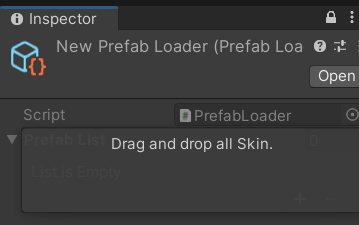

借工作之便解決了先前想不到的 Drag and drop 的判斷.
- 利用 Event.Current 上的 EventType.DragUpdated, DragPerform 等抓取 Drag 狀態
- 使用 GUILayoutUtility.GetLastRect() 取得先前的 list element 的繪畫大小並覆蓋.
- 分拆出 DragAndDrop.objectReferences (選取的 Asset list) 並放入 nest 結構的 struct 裡面 (a.k.a: NamedPrefab)

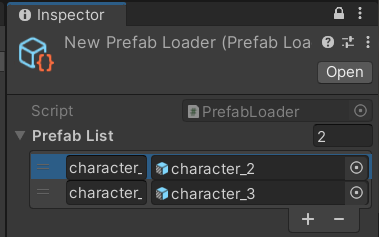
using System.Collections;
using System.Collections.Generic;
using UnityEngine;
#if UNITY_EDITOR
using UnityEditor;
#endif
namespace Test
{
    [CreateAssetMenu]
    public class PrefabLoader : ScriptableObject
    {
        [System.Serializable]
        public struct NamedPrefab
        {
            public GameObject prefab;
            public string name;
        }
        public List<NamedPrefab> m_PrefabList;

        private Dictionary<string, GameObject> m_PrefabDic = null;
        public Dictionary<string, GameObject> PrefabDic
        {
            get
            {
                if (m_PrefabDic == null)
                {
                    m_PrefabDic = new Dictionary<string, GameObject>(m_PrefabList.Count);
                    for (int i = 0; i < m_PrefabList.Count; ++i)
                    {
                        // Noted: assume not require duplicate checking.
                        m_PrefabDic.Add(m_PrefabList[i].name, m_PrefabList[i].prefab);
                    }
                }
                return m_PrefabDic;
            }
        }
    }

#if UNITY_EDITOR

    [CustomEditor(typeof(PrefabLoader), true)]
    public class PrefabLoaderInspector : Editor
    {
        SerializedProperty scriptProp;
        SerializedProperty prefabListProp;
        private void OnEnable()
        {
            scriptProp = serializedObject.FindProperty("m_Script");
            prefabListProp = serializedObject.FindProperty(nameof(PrefabLoader.m_PrefabList));
        }

        public override void OnInspectorGUI()
        {
            serializedObject.UpdateIfRequiredOrScript();
            SerializedProperty iter = serializedObject.GetIterator();
            iter.NextVisible(true);
            EditorGUI.BeginDisabledGroup(true);
            EditorGUILayout.PropertyField(scriptProp, includeChildren: true);
            EditorGUI.EndDisabledGroup();

            EditorGUI.BeginChangeCheck(); // ---- change check [optional]

            do
            {
                if (scriptProp != null && iter.propertyPath == scriptProp.propertyPath)
                {
                    // do nothing.
                }
                else
                {
                    OnDrawProperty(iter);
                }
            }
            while (iter.NextVisible(false));

            if (EditorGUI.EndChangeCheck()) // ---- change check [optional]
                serializedObject.ApplyModifiedProperties();
        }

        private void OnDrawProperty(SerializedProperty property)
        {
            if (property.propertyPath == prefabListProp.propertyPath)
            {
                EditorGUILayout.PropertyField(property);
                DragArea(GUILayoutUtility.GetLastRect(), property, NamedPrefabEditorDrawer.CustomDraw);
            }
            else
            {
                EditorGUILayout.PropertyField(property);
            }
        }

        public delegate void InsertProperty(SerializedProperty listProperty, UnityEngine.Object interactObj);

        private void DragArea(Rect area, SerializedProperty property, InsertProperty drawCallback)
        {
            Event evt = Event.current;
            if (evt.type == EventType.Repaint &&
                DragAndDrop.visualMode == DragAndDropVisualMode.Copy)
                GUI.Box(area, "Drag and drop all Skin.", GUI.skin.window);
            switch (evt.type)
            {
                case EventType.DragUpdated:
                case EventType.DragPerform:
                    if (!area.Contains(evt.mousePosition))
                        return;
                    DragAndDrop.visualMode = DragAndDropVisualMode.Copy;

                    if (evt.type == EventType.DragPerform)
                    {
                        DragAndDrop.AcceptDrag();
                        if (property.isArray)
                        {
                            foreach (UnityEngine.Object obj in DragAndDrop.objectReferences)
                            {
                                if (!(obj is GameObject prefab))
                                    continue;
                                if (!string.IsNullOrEmpty(prefab.scene.path))
                                {
                                    Debug.LogError($"Scene object {prefab.name} not allow");
                                    continue;
                                }
                                int last = property.arraySize;
                                property.InsertArrayElementAtIndex(last);
                                drawCallback?.Invoke(property.GetArrayElementAtIndex(last), obj);
                                property.serializedObject.ApplyModifiedProperties();
                            }
                        }
                        else
                        {
                            // Debug.LogError("Haven't test");
                            var obj = DragAndDrop.objectReferences.GetValue(0) as UnityEngine.Object;
                            drawCallback?.Invoke(property, obj);
                        }
                    }
                    break;
                case EventType.MouseUp:
                    DragAndDrop.PrepareStartDrag();
                    break;
            }
        }
    }

    [CustomPropertyDrawer(typeof(PrefabLoader.NamedPrefab), true)]
    public class NamedPrefabEditorDrawer : PropertyDrawer
    {
        public static void CustomDraw(SerializedProperty property, UnityEngine.Object interactObj)
        {
            // Debug.Log(listProperty.propertyType);
            var nameProp = property.FindPropertyRelative(nameof(PrefabLoader.NamedPrefab.name));
            var prefabProp = property.FindPropertyRelative(nameof(PrefabLoader.NamedPrefab.prefab));
            nameProp.stringValue = interactObj.name;
            prefabProp.objectReferenceValue = interactObj;
            property.serializedObject.ApplyModifiedProperties();
        }

        public override float GetPropertyHeight(SerializedProperty property, GUIContent label)
        {
            // return base.GetPropertyHeight(property, label);
            return EditorGUIUtility.singleLineHeight;
        }
        public override void OnGUI(Rect position, SerializedProperty property, GUIContent label)
        {
            EditorGUI.BeginProperty(position, label, property);
            // position = EditorGUI.PrefixLabel(position, label);
            Rect[] rect = { position, position };
            const float hSpace = 4f;
            rect[0].width = EditorGUIUtility.labelWidth - hSpace;
            rect[1].width = rect[1].width - rect[0].width;
            rect[1].x += rect[0].width + hSpace;
            SerializedProperty nameProp = property.FindPropertyRelative(nameof(PrefabLoader.NamedPrefab.name));
            SerializedProperty prefabProp = property.FindPropertyRelative(nameof(PrefabLoader.NamedPrefab.prefab));

            EditorGUI.BeginChangeCheck();
            string tmp = EditorGUI.TextField(rect[0], nameProp.stringValue);
            EditorGUI.PropertyField(rect[1], prefabProp, GUIContent.none, false);
            if (EditorGUI.EndChangeCheck())
            {
                if (string.IsNullOrEmpty(tmp) && prefabProp.objectReferenceValue != null)
                {
                    tmp = prefabProp.objectReferenceValue.name;
                }
                nameProp.stringValue = tmp;
                property.serializedObject.ApplyModifiedProperties();
            }
            EditorGUI.EndProperty();
        }
    }
#endif
}

請教一下為什麼要Call UpdateIfRequiredOrScript,我一直搞不懂這個部分,但很多教學都直接寫要Call這個方法,想請問他實際上做了什麼?
官方文檔就有提到 UpdateIfRequiredOrScript
它就是把資料更新的 event 觸發一次,這樣確保 inspector收到event進行重繪.